
Pittman Labs / iPhone
Micromixer.
Control in your pocket.
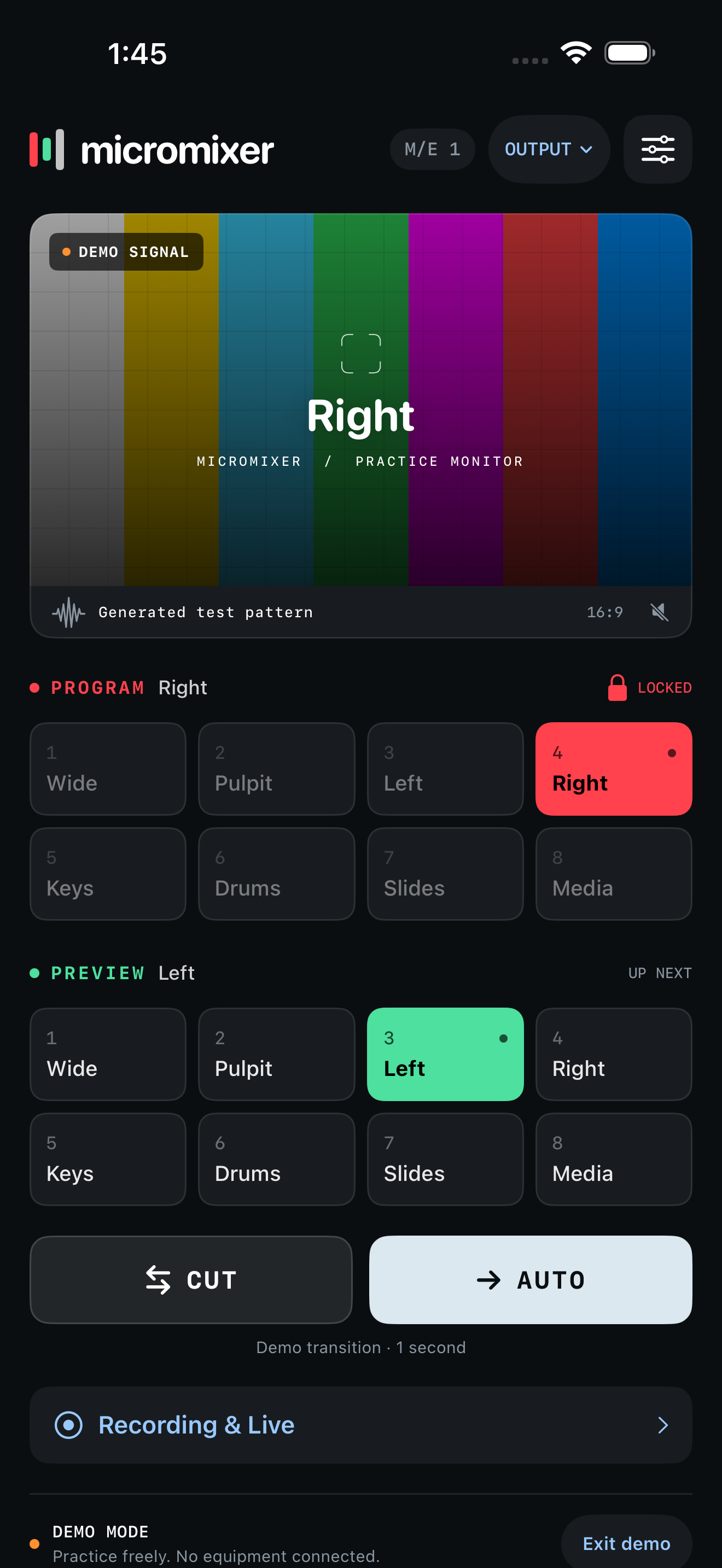
Your ATEM controls and SRT picture, together on a portrait iPhone interface.
Awaiting App Store review. The planned U.S. launch is $4.99 as a one-time purchase for iPhone with iOS 17 or later. The App Store link will appear here once public availability is confirmed.
Read the setup guide Downloads and availability
Switch and monitor wherever you work
- Select Program and Preview sources, use Cut or Auto, and keep direct Program changes locked until you need them.
- Receive an SRT Program or multiview feed from your encoder. Video and switcher control connect independently.
- Route auxiliary outputs and manage separately configured HyperDeck recording and Web Presenter streaming.
- Practice with the clearly labeled offline demo before connecting equipment.
Your setup
See how ATEM video reaches your iPhone, including hardware sender options and Wi-Fi, VPN or cellular routes.
Connect directly to an ATEM on your local network, or use the optional Micromixer Bridge over a network you can reach through your own VPN. An SRT sender provides the video feed; the Bridge carries switcher control.
Start with the video setup guide, then visit support for connection checks. The Micromixer privacy policy describes how the iPhone app handles your settings and connections.
Prefer a larger workspace?
Meet Macromixer for Mac for desktop switching, or explore CameraMixer for iPad, the dedicated camera controller in development.